

Indeed Job Search review
 Analysis by GetAllApps
I think Indeed is most useful when a job search has to fit around ordinary life rather than take over the whole day. You can check opportunities between errands, save promising roles to revisit, and keep track of applications without making a household’s shared computer or phone the center of the process. In my view, its biggest strength is the breadth of its job-search focus; its biggest practical challenge is staying organized when many listings look similar.
Fitting a job search into shared daily life
Indeed Job Search is a free business app from Indeed Jobs for people looking for work. It has a 4.7 average rating from around 14 million ratings and more than 100 million installs, which gives it a substantial presence among job-search apps. That reach is useful, but popularity alone does not make every listing a good fit. I would treat the app as a place to explore and manage possibilities, then read each opportunity carefully before deciding whether to apply.
A realistic use case is someone who shares a device with a partner or family member and has only short windows to search. They can browse when they have a moment, note roles worth a closer look, and return later to prepare an application. This is more manageable than trying to make a single long search session cover everything. I recommend keeping job-search activity distinct from another person’s browsing and account use: each person should use their own account and take care not to leave private application details visible on a shared screen.
That boundary matters because a job search can involve personal information, employment history, and decisions that are not meant for everyone in the household. A shared device does not automatically mean a shared job-search account is a good idea. If another person needs to help review a résumé or compare options, it is safer to share the relevant material deliberately than to leave an account open for anyone to browse. I would also sign out or otherwise secure the session when finished, especially on a device used by several people.
The app can help a household coordinate around practical constraints without turning the search into a group project. For example, a person might shortlist roles that match their schedule and discuss commute or childcare arrangements with a partner before applying. The useful division is clear: the job seeker decides what to pursue, while family members can help think through logistics if invited. Indeed is a search tool, not a substitute for those conversations or a shared household planning system.
Setting sensible account and device boundaries
Before browsing, I would decide what information belongs in the job-search account and who, if anyone, should see it. On a personal phone, that may be straightforward. On a shared tablet or household computer, it is worth being more deliberate: avoid leaving application pages open, keep résumé files in an appropriate private location, and check which account is active before saving anything. These are simple habits, but they prevent the common confusion of mixing one person’s saved opportunities with another person’s search.
A practical workflow is to keep one person’s search focused at a time. If two adults are job hunting on the same device, they can take turns and confirm the account before saving a listing or working on an application. This is less convenient than having separate devices, but it reduces the risk of misplaced notes and mistaken submissions. I would not assume the app provides family profiles or household controls; the safer approach is to manage access through ordinary account and device habits.
Another useful boundary is separating exploration from commitment. Browsing a role does not mean it is suitable, and saving a possibility should not be treated as a promise to apply. I find it helpful to make a short personal checklist outside the browsing moment: acceptable schedule, location or commute, role requirements, and any non-negotiable conditions. That gives a quick way to filter a tempting headline against real life, especially when several people in a household are balancing work, care, and transport.
Coordinating applications without losing track
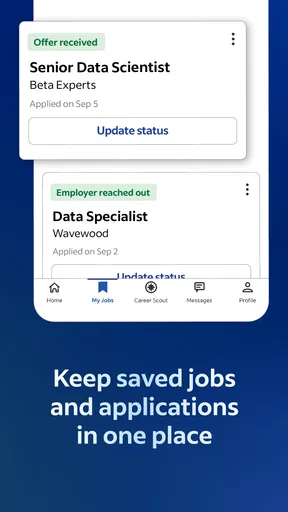
When a search gets busy, the hard part is often not finding another opening; it is remembering what happened with the ones already considered. I recommend reviewing saved or recently considered roles in batches rather than repeatedly opening the same listings during spare minutes. For each serious option, note the employer, role, date of action, and next step in a private tracker that suits you. This helps distinguish “interesting” from “applied” and makes it easier to follow up thoughtfully.
For a shared household, a weekly check-in can be more useful than constant updates. The job seeker can explain which opportunities need a practical decision—perhaps a shift pattern affects school pickup or a commute changes the household schedule—without handing over control of the account. This keeps coordination focused on real constraints. If nobody else needs to weigh in, there is no reason to share every search result; privacy and concentration can matter just as much as support.
Indeed is also best used as one part of a careful application process. I would compare a listing’s details with the employer’s own hiring information before sending sensitive material, and I would be wary of any request that seems out of step with a normal application. A broad search app can make discovery convenient, but the reader still needs to judge whether an opening is credible, current, and appropriate. Taking a moment to verify the role is a better trade-off than rushing because a listing looks promising.
Compared with checking individual employer career pages one by one, a job-search app is convenient for scanning a range of openings in one place. Compared with a specialist recruiter or a personal referral, it is less tailored: it helps with discovery and organization, but it cannot replace a person who knows your field or can advise on a particular employer. I would use Indeed for breadth, then rely on direct employer information, professional contacts, or a specialist service when a role requires deeper industry guidance.
Age, trust, and who should use it
The app is rated for Everyone, and its current version is 300.0.0, with Android support starting at version 8.0. That age rating describes the app’s content classification, not whether every job opportunity is suitable for every person. A young person considering work should involve a trusted adult where appropriate and check local rules and the employer’s requirements. The presence of a listing is not a guarantee that an applicant meets its conditions.
For adults actively seeking work, Indeed is a reasonable option if they want a broad, app-based way to look for openings and revisit possibilities. It may also suit someone returning to work who needs to search in short sessions around other responsibilities. I would be more cautious about recommending it as the only resource for a senior specialist, a person seeking confidential career advice, or someone who needs extensive support tailoring applications. In those cases, a recruiter, professional network, or targeted industry resource may be a better complement.
Trust is not just about the app itself; it is also about how carefully a person evaluates what they find. Read job descriptions for duties and requirements rather than relying on titles, and compare details before sharing personal documents. If an opportunity feels unclear, pause and investigate instead of assuming that a familiar platform makes every employer or listing equally dependable. That habit is especially important when several people in a household are sharing advice and someone else may be tempted to act quickly on the job seeker’s behalf.
Where the experience can feel demanding
The main friction I would expect from a broad job-search tool is the work of filtering. A large pool of possibilities can be helpful, but it can also create decision fatigue: similar titles may conceal different schedules, expectations, or locations. The app cannot decide which trade-offs matter most to you. A clear personal shortlist of priorities makes the search more efficient and stops endless browsing from feeling like progress when no application is actually moving forward.
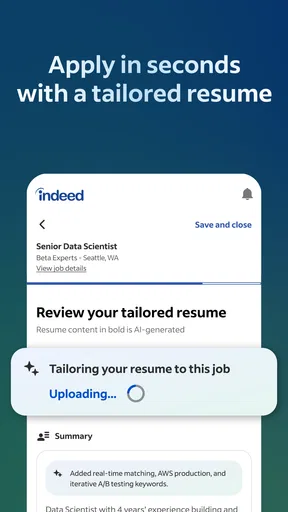
There is also a difference between finding a role and presenting a strong application. Browsing can occupy the easiest part of the process, while tailoring a résumé, checking requirements, and preparing responses takes more effort. I would set a limit on discovery sessions and reserve separate time for application work. If you are sharing a device, that separation has an additional benefit: it reduces the chance that someone else’s use interrupts a sensitive application or changes the account context midway through.
People who already have a focused list of employers may prefer to go directly to those employers’ hiring pages, where they can concentrate on a narrower set of opportunities. Likewise, a person who needs one-to-one career coaching may get more value from a counselor or experienced contact than from more listings. Indeed is strongest when the problem is discovering and keeping track of possible jobs; it is not a complete answer to every part of finding work.
My household verdict
I would recommend Indeed to a friend who wants a free, convenient way to explore job openings and who is prepared to make their own careful decisions about fit and trust. Its scale is an advantage for discovery, and the app’s business focus makes sense for people who want a dedicated job-search tool rather than a general-purpose social platform. The developer is Indeed Jobs, and the app is available to a broad audience, but the practical value still depends on using it with a clear plan.
For households, my advice is simple: keep accounts personal, protect application details on shared devices, and coordinate around schedules or transport rather than sharing control of the search. Use a short checklist to screen roles, track serious applications separately, and verify details before sending sensitive information. Those habits make the experience more purposeful and reduce confusion when several people are using the same device or supporting the same job seeker.
My bottom line: Indeed is a useful starting point for finding work, not a promise that the right role will appear or that every listing deserves an application. I would choose it for broad exploration and everyday organization, then add direct employer research or human career advice when the decision calls for more depth. If you can maintain sensible privacy boundaries and avoid confusing browsing with progress, it can fit neatly into a busy household routine.
Pros and cons
Pros
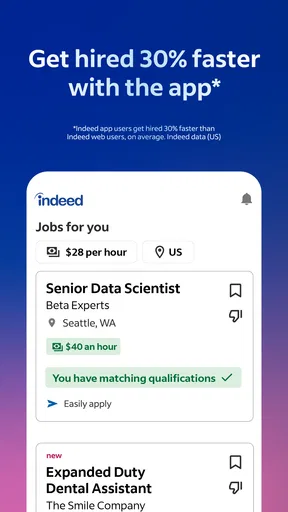
- Search jobs by title company or location.
- Save listings to review later.
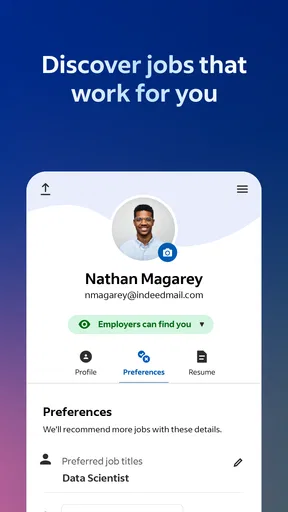
- Upload a résumé to apply more quickly.
- Create alerts for new matching jobs.
- Read company reviews before applying.
Cons
- Some listings redirect to external application sites.
- Job availability varies by location.
- Not every employer responds to applicants.
- Some features require an Indeed account.
- Search results may include expired listings.


